An AI Agent That Answers Client Project Questions by Email
Stakeholders ask about project status over email an AI agent queries Jira and Confluence, then replies with verified facts

The problem: Project status questions that interrupt the team
Stakeholders need to know how their projects are going. It is a reasonable question and one that gets asked constantly. How is the sprint progressing? What is left to do? What happened with the dataset? When will the next milestone be ready?
Each question is simple. The cost is in who answers it and how. A project lead receives the email, opens Jira to check the sprint board, switches to Confluence to review documentation, composes a reply with the relevant details, and sends it back. Fifteen minutes for a straightforward question. Longer if it requires pulling together information from multiple sources.
The interruption cost is harder to measure but just as real:
- Context switching - every status inquiry pulls someone out of focused work. The reply itself takes minutes, but the disruption to their flow takes longer to recover from.
- Inconsistent responses - different people summarize project status differently. One reply is detailed and structured, the next is a quick two-liner. Stakeholders receive an uneven experience depending on who answers and when.
- Delayed replies - when the person who knows the project is busy, in a meeting, or on leave, the question sits unanswered. Stakeholders follow up. The cycle repeats.
- No record of what was communicated - replies live in individual email threads. There is no centralized log of what was asked, what was answered, and whether the information was accurate.
The information stakeholders need already exists in Jira tasks, sprint boards, and Confluence pages. The bottleneck is not access to data. It is the human effort required to retrieve it, assemble it, and deliver it in a client-appropriate format.
What it does
The Client Project Status Email Agent is an AI-powered system that receives stakeholder emails, determines what is being asked and about which project, queries Jira and Confluence for verified data, and replies with a concise, client-safe response all without a team member intervening.
A stakeholder sends an email to a dedicated project address. The agent identifies who they are, which projects they are associated with, and what they are asking. If the question is clear, it pulls the relevant data from Jira and Confluence, composes a structured response, and replies in the same email thread. If the project or question is ambiguous, it asks for clarification before proceeding.
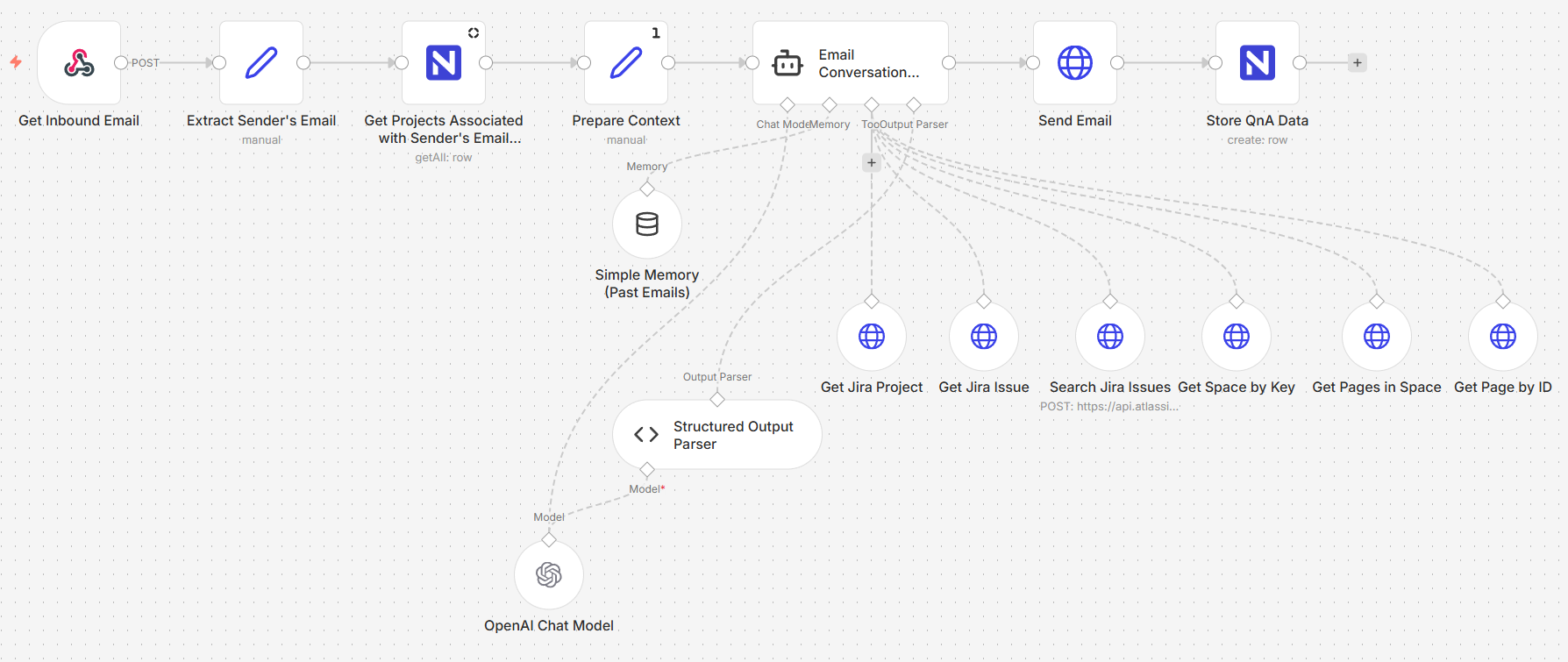 Image 1 - The email agent workflow
The system operates in three stages:
Stage 1: Inbound email retrieval and context preparation
When an email arrives, the system extracts the sender's address, the subject, the message body, and the thread metadata. It then queries a Projects table to determine which projects the sender is associated with matching their email against a registry of stakeholders and project keys.
This context who is asking, what projects they have access to, and what they wrote is assembled into a structured input and passed to the AI agent. The agent never operates blind; it always knows the sender's identity and their project associations before it begins reasoning.
Stage 2: Agentic communication and question handling
The core of the system is an AI agent powered by GPT-5.2 with access to Jira and Confluence as tools. The agent receives the prepared context and follows a structured decision process:
| Step | What the Agent Does |
| Intent recognition | Determines whether the email is a project question, a follow-up, a thank-you, or something out of scope |
| Project identification | Matches the inquiry to a specific project using the sender's associations and the email content |
| Access validation | Confirms the sender is authorized to receive information about the identified project |
| Data retrieval | Queries Jira for sprint status, task progress, and issue details; queries Confluence for documentation and technical context |
| Response generation | Composes a concise, client-safe reply using only verified facts from the retrieved data |
The agent classifies every inquiry general status check, specific technical question, repeated request, or out-of-scope and every response valid answer, clarification needed, access denied, or polite closure. This classification is stored alongside the conversation for traceability.
Critically, the agent operates under strict rules: it uses only facts retrieved from Jira and Confluence, it does not guess or speculate, and it does not expose internal technical identifiers or team-facing details. The response is always written for a client audience.
The agent also maintains conversational memory per sender, so follow-up questions in the same thread are handled with context from earlier messages.
Stage 3: Response delivery and data storage
The agent's response is sent back to the stakeholder as a reply in the original email thread maintaining a natural conversation flow. Simultaneously, the full exchange is logged to a NocoDB table: the original question, the agent's response, the project key, the question and response classifications, timestamps, and message IDs.
This creates a structured record of every stakeholder interaction what was asked, what was answered, and how the inquiry was classified. Over time, this log becomes a traceable history of client communications that the team can review, audit, or learn from.
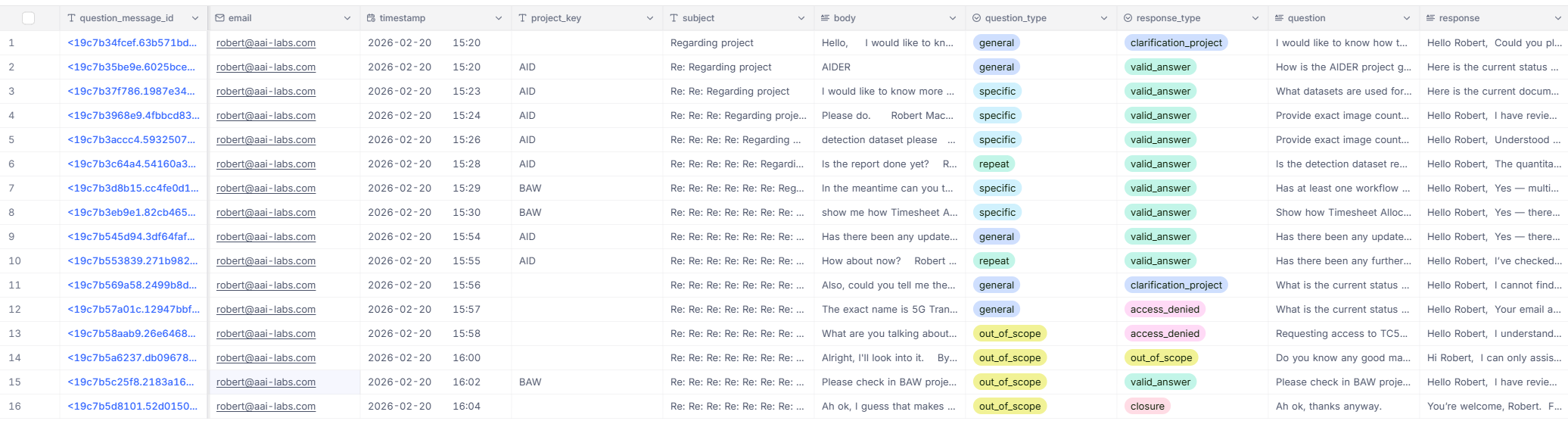 Image 2 - The conversation log
Under the hood
A single n8n workflow handles the full cycle, divided into three logical stages.
Email reception - A webhook triggers when a new email arrives at the dedicated inbox. The payload is parsed to extract the sender, subject, body, thread ID, and message metadata.
Stakeholder lookup - The sender's email is matched against the Projects table in NocoDB. The query returns every project the sender is associated with, along with project names, Jira keys, and descriptions.
Context assembly - The extracted email data and the stakeholder's project associations are merged into a single structured prompt for the agent.
Agent execution - The AI agent receives the prompt and has access to six tools: Jira project retrieval, Jira issue retrieval, Jira issue search, Confluence space lookup, Confluence page listing, and individual page retrieval. The agent decides which tools to call based on the question, retrieves the relevant data, and generates a structured JSON response containing the project key, cleaned question, response text, question type, and response type.
Reply delivery - The response field from the agent's output is sent as an email reply in the same thread. Only the client-facing response is sent; internal metadata stays in the system.
Conversation logging - The full exchange question, response, classifications, timestamps, and message IDs is written to the ClientEmailAgentConversations table in NocoDB.
What this enables
The system demonstrates what becomes possible when an AI agent has structured access to the tools where project data actually lives:
- Stakeholders get answers in minutes, not hours - the agent replies as soon as it has retrieved and composed the response. No waiting for someone to be available.
- Every response is grounded in verified data - the agent pulls directly from Jira and Confluence. It does not paraphrase from memory or improvise answers.
- Client-safe by design - the agent is instructed to exclude internal identifiers, team-facing notes, and technical jargon. Responses are written for a stakeholder audience.
- Conversational context carries forward - follow-up questions in the same thread are handled with awareness of what was previously asked and answered.
- Every interaction is logged and classified - the conversation table creates an auditable history of what information was communicated to which stakeholder and when.
What comes next
The core system successfully handles the end-to-end email-to-response cycle. As we expand the agent's capabilities to handle even more complex project intelligence, our roadmap includes:
- Vector-based knowledge retrieval - embedding Confluence pages and Jira content into a vector store, enabling the agent to find relevant documentation through semantic similarity rather than relying solely on structured search.
- Agent traceability - logging which tools the agent called, what data it retrieved, and how it arrived at its response, giving the team full visibility into the reasoning chain behind every reply.
- Multi-model validation - splitting the response pipeline into stages data collection, summarization, and self-validation so that one model gathers facts, another composes the response, and a third checks it against the rules before sending.
- Expanded tool access - connecting the agent to additional data sources beyond Jira and Confluence, such as time tracking systems, deployment dashboards, or milestone databases, broadening the range of questions it can answer accurately.
The bigger picture
Every organization that runs projects for clients faces the same tension: stakeholders deserve timely, accurate updates, but the people best equipped to provide them are the same people doing the work. Every status email answered is time not spent building.
The Client Project Status Email Agent resolves that tension by putting an AI between the question and the answer one that has direct access to the same project tools the team uses, follows strict rules about what it can and cannot say, and logs every interaction for accountability. The team stays focused. The stakeholder gets a response. The record keeps itself.