Automating Timesheet Allocation and Confirmation with n8n and Slack
How we turned Jira activity logs into verified monthly time allocations with zero spreadsheet work.

The problem: Time allocation nobody trusts
At the end of every month, someone has to answer a deceptively simple question: how much of each person's time went to which project? In theory, the data exists tasks are logged in Jira, story points are assigned, and work gets marked as done. In practice, turning that raw activity into a clear time allocation breakdown is a manual ordeal.
The person responsible has to pull completed tasks for every team member, group them by project, calculate the proportions, enter the results into a spreadsheet, and then ask each employee to confirm the numbers are right. When someone disagrees, the back-and-forth happens over email or chat with no structured way to track it.
The friction compounds in several places:
- Manual calculation from raw data - extracting completed tasks per person per project from Jira, summing story points, and converting those into percentage allocations. One person's monthly report touches dozens of tasks across multiple boards.
- No single source of truth - allocation numbers live in spreadsheets that are manually maintained. Different versions circulate, and there is no reliable historical record to reference later.
- Confirmation is informal - asking people to verify their allocations happens over chat or email. There is no structured workflow, no status tracking, and no way to tell at a glance who has confirmed and who has not.
- Reminders fall on the person, not the system - when someone does not confirm, the person running the process has to remember to follow up. Repeatedly. Individually.
We built a system that handles the full cycle: calculate, notify, confirm, and record automatically, every month.
What we built
The Timesheet Allocation & Confirmation System connects Jira, NocoDB, and Slack into a single automated loop. On the first of every month, it calculates each employee's time allocation across projects based on their completed Jira tasks, writes the results to a structured database, sends personalized Slack notifications asking each person to confirm their allocation, and follows up daily until everyone has responded.
The system operates in three phases:
Phase 1: Calculate time allocations from Jira data
On the first day of each month, the pipeline pulls every completed task from the previous month for every active Jira user. For each person, it groups tasks by project, sums the story points, and calculates what percentage of their effort went where.
The results are written to a NocoDB table, one row per person per project per month with the estimated allocation percentage, a status field set to "Pending", and the employee's email for matching later.
| Field | What It Stores |
| Person | The employee's name |
| Project | The Jira project the work was logged against |
| Month | The reporting period (YYYY-MM) |
| SP | Total story points completed on that project |
| Estimated | Calculated allocation percentage |
| Confirmed | The verified percentage (filled on confirmation) |
| Status | Pending or Confirmed |
The pipeline handles edge cases: tasks without assigned story points receive a default value, and boards that track objectives rather than individual work are excluded from the calculation. Duplicate rows are prevented by checking existing records before inserting.
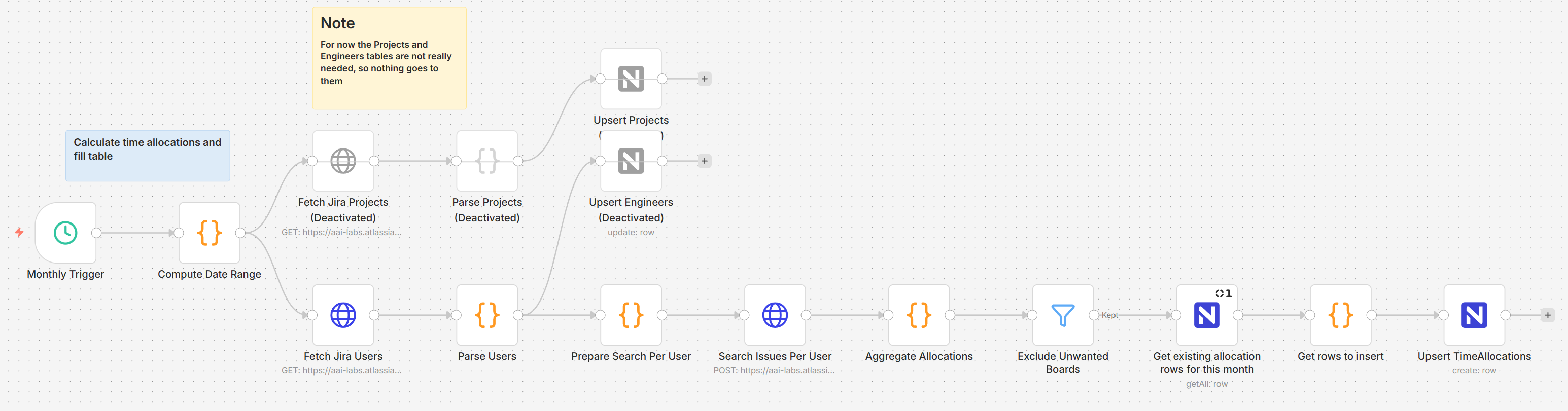 Image 1 - The monthly calculation workflow
Phase 2: Notify employees via Slack
Once allocations are calculated, a daily notification workflow takes over. It fetches all "Pending" rows for the target month, looks up each employee's Slack ID from an automatically maintained employee directory, and groups the allocation data by person.
Each employee receives a single Slack message showing their full project breakdown for the month every project, the estimated percentage, and a Confirm button. One message, one action, no ambiguity.
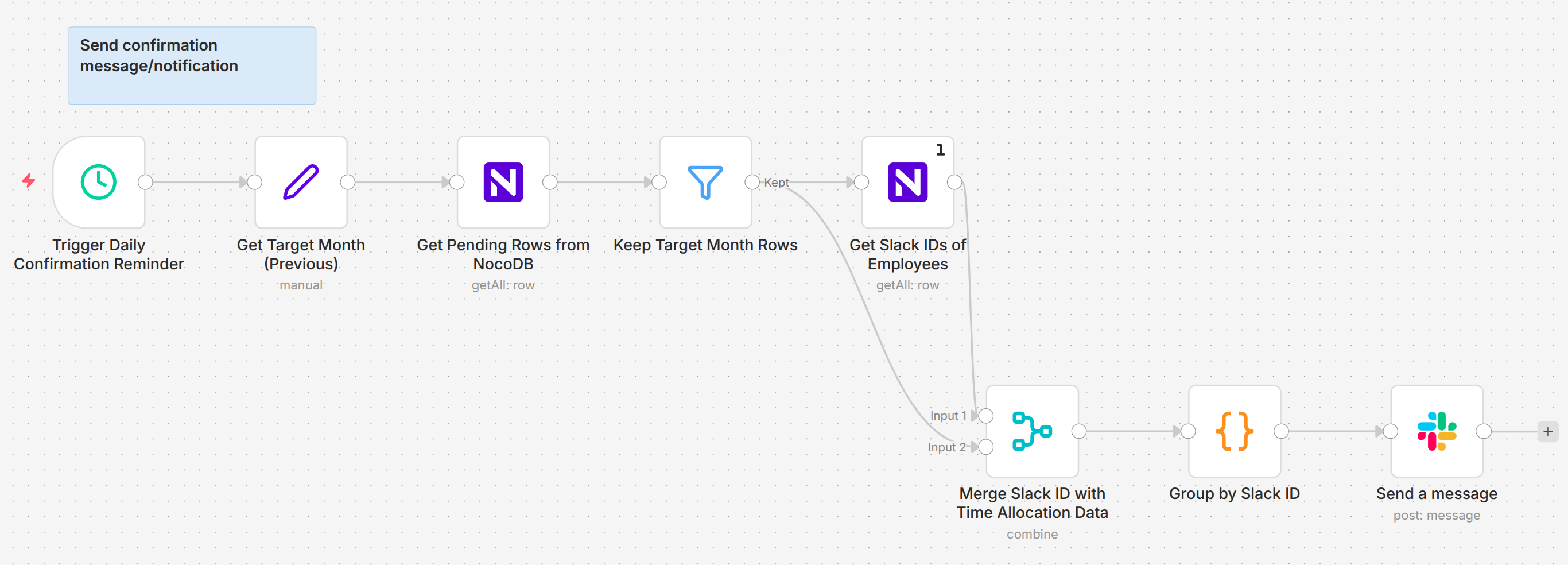 Image 2 - The daily notification workflow
The output of this daily workflow is a clean, direct message delivered straight to the employee's Slack. Here is what that automated request looks like from their perspective:
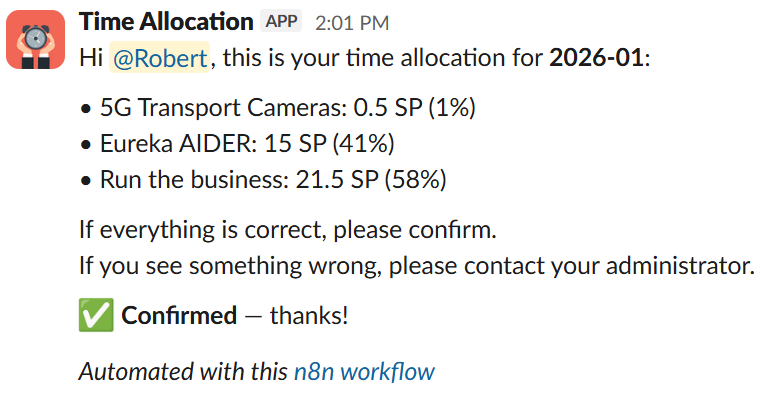 Image 3 - The Slack confirmation message
If an employee does not confirm, they receive the same message again the next day. Once they confirm, the reminders stop. No one on the team has to track who responded and who did not the system handles it.
Phase 3: Record confirmation and close the loop
When an employee clicks Confirm, a webhook captures the interaction. The system updates their allocation rows in NocoDB setting the status to "Confirmed" and copying the estimated value into the confirmed field and removes the button from the Slack message to prevent duplicate submissions.
The result is a clean database where management can see at a glance: who has confirmed, who is still pending, and what the allocation breakdown looks like across every project for any given month.
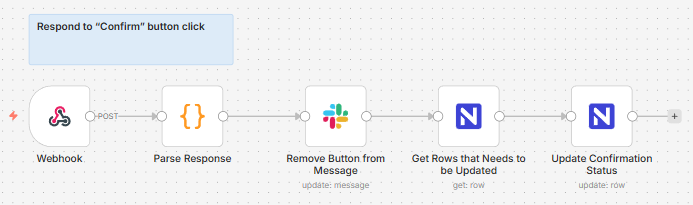 Image 4 - The confirmation response workflow
No one has to manually cross-reference a Slack reply with a master spreadsheet. The webhook catches the click and updates the central database instantly, separating the finished allocations from the pending ones at a glance:
 Image 3 - Pending versus confirmed allocation rows
How the system fits together
Three n8n workflows coordinate the full cycle, each handling a distinct responsibility.
Monthly calculation workflow - Triggered on the first of every month at 6 AM. Fetches all active Jira users, queries their completed tasks for the previous month, calculates story point allocations per project, checks for existing records to avoid duplicates, and inserts new rows into the NocoDB TimeAllocations table.
Daily notification workflow - Triggered every day at 10 AM (after the calculation has completed on the first of the month). Fetches all pending rows for the target month, retrieves Slack IDs from the Employees table, groups allocations by person, and sends a single consolidated Slack message to each employee who has not yet confirmed.
Confirmation response workflow - Triggered by a Slack webhook when an employee clicks the Confirm button. Parses the interaction payload, updates the corresponding NocoDB rows to "Confirmed" status, and removes the button from the original message.
The timing is deliberate. Calculations run at 6 AM so data is ready before the workday. Notifications go out at 10 AM during working hours, after people have settled in. Daily reminders ensure nothing falls through without being aggressive.
A separate supporting workflow keeps the Employees table current by syncing active members from Slack daily. Employees who leave the workspace are automatically archived, so they stop receiving confirmation requests without anyone manually updating a list.
The difference it made
Before: Someone spends hours at the end of every month pulling Jira data, building allocation spreadsheets, sending individual messages asking for confirmation, tracking who responded, and following up with those who did not. The process is slow, error-prone, and depends entirely on one person's diligence.
After: Allocations are calculated from Jira data on the first of the month. Employees receive a Slack message with their breakdown and a single button to confirm. Daily reminders handle follow-ups automatically. Management opens a single table to see the status of every person across every project.
What this changed:
- Monthly calculation went from hours to minutes - story point aggregation, project grouping, and percentage calculation all happen automatically from live Jira data.
- Confirmation became structured - a Slack button replaced informal chat messages. Every response is recorded, timestamped, and reflected in the database.
- Follow-ups are automatic - daily reminders continue until each employee confirms. No one has to track who is outstanding or send manual nudges.
- Management has a live view - the NocoDB Contributions view groups allocations by project and month, showing exactly who contributed what, at any time.
What comes next
The current system covers the core monthly cycle. Several directions would extend its value:
- Interactive editing in Slack - allowing employees to adjust their allocation percentages directly in the confirmation message when the estimates do not match reality, rather than confirming or leaving it pending.
- Google Sheets sync - automatically pushing confirmed allocations to the existing company spreadsheet format, bridging the gap between the new system and legacy reporting.
- Historical trend analysis - surfacing how individual and team allocations shift month over month, helping leadership spot capacity patterns before they become problems.
- Multi-source time tracking - incorporating time data beyond Jira for employees whose work is not fully captured in task boards, such as client-facing consulting or cross-team support.
The bigger picture
Time allocation is one of those processes that every organization needs but nobody wants to own. It sits at the intersection of project tracking, financial reporting, and people management too important to skip, too tedious to enjoy, and too error-prone when done manually.
The Timesheet Allocation & Confirmation System does not just save time. It creates a verifiable record: calculated from real task data, confirmed by each employee, and stored in a structured database that management can query at any point. The numbers are not someone's best guess copied into a spreadsheet. They are computed from the work that was actually done, and signed off by the people who did it.